Blvck Digital Planner
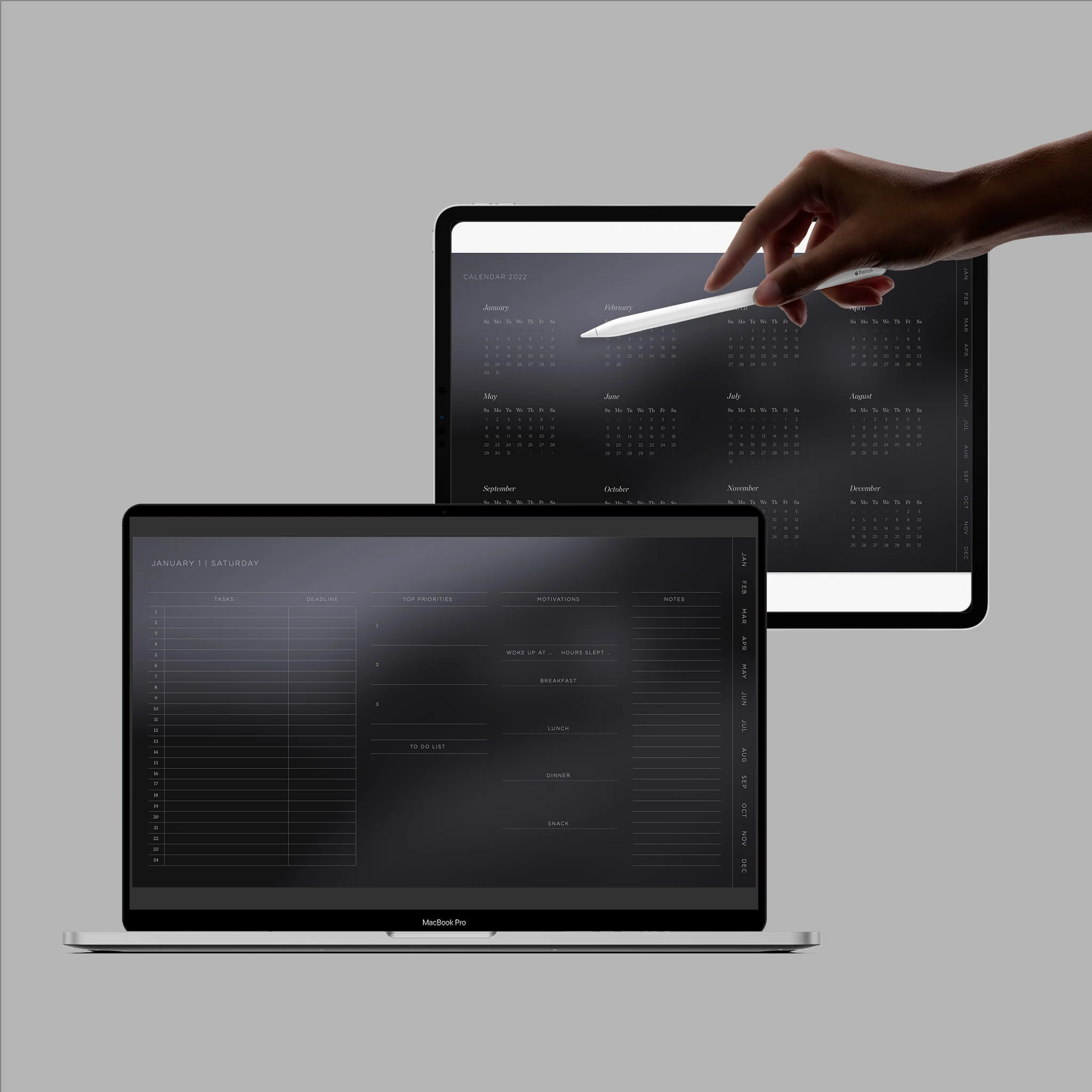
The All-in-one 'Blvck Digital Planner' has been carefully designed to maximize productivity and lifestyle.
The planner helps you keep track of your yearly goals monthly progress, and daily tasks.
Our interactive planner builder lets you mix and match between our aesthetic wallpapers, a dozen of Blvck and Whte digital Stickers, and weekly start date!
Digital Planner Highlight:
- Contains 26 Blvck x Whte Digital Stickers
- 13 Aesthetic Wallpapers available
- Hyperlinks for smooth, effortless navigation
The All-in-one digital planner has been designed to be used in conjunction with any PDF annotation app.
Follow these steps to install the Digital Planner:
1) Download a note-taking app from your tablet/computer. Goodnotes, Notability, Noteshelf and Xodo are best suited.
2) Download your digital agenda, which you will find in PDF format.
3) Import your digital diary into the previously installed note-taking application.
If you installed GoodNotes (available on iOS), you can take a look at the following tutorial to get familiar with the app:
Compatibility Check:
- Compatible across Apple, Android, and Windows devices
- Compatible with iPads, tablets (not Kindle Fire), desktop (both Windows and Apple) and Laptop computers
- Not designed for use with OneNote
- Not designed for use with mobile phones
Notes:
- This is a digital product and as such no physical product will be shipped
- This item is not designed to be printed
- Digital goods cannot be returned due to the nature of the product.
The All-in-one 'Blvck Digital Planner' has been carefully designed to maximize productivity and lifestyle.
The planner helps you keep track of your yearly goals monthly progress, and daily tasks.
Our interactive planner builder lets you mix and match between our aesthetic wallpapers, a dozen of Blvck and Whte digital Stickers, and weekly start date!
Digital Planner Highlight:
- Contains 26 Blvck x Whte Digital Stickers
- 13 Aesthetic Wallpapers available
- Hyperlinks for smooth, effortless navigation
The All-in-one digital planner has been designed to be used in conjunction with any PDF annotation app.
Follow these steps to install the Digital Planner:
1) Download a note-taking app from your tablet/computer. Goodnotes, Notability, Noteshelf and Xodo are best suited.
2) Download your digital agenda, which you will find in PDF format.
3) Import your digital diary into the previously installed note-taking application.
If you installed GoodNotes (available on iOS), you can take a look at the following tutorial to get familiar with the app:
Compatibility Check:
- Compatible across Apple, Android, and Windows devices
- Compatible with iPads, tablets (not Kindle Fire), desktop (both Windows and Apple) and Laptop computers
- Not designed for use with OneNote
- Not designed for use with mobile phones
Notes:
- This is a digital product and as such no physical product will be shipped
- This item is not designed to be printed
- Digital goods cannot be returned due to the nature of the product.
Original: $15.00
-65%$15.00
$5.25Description
The All-in-one 'Blvck Digital Planner' has been carefully designed to maximize productivity and lifestyle.
The planner helps you keep track of your yearly goals monthly progress, and daily tasks.
Our interactive planner builder lets you mix and match between our aesthetic wallpapers, a dozen of Blvck and Whte digital Stickers, and weekly start date!
Digital Planner Highlight:
- Contains 26 Blvck x Whte Digital Stickers
- 13 Aesthetic Wallpapers available
- Hyperlinks for smooth, effortless navigation
The All-in-one digital planner has been designed to be used in conjunction with any PDF annotation app.
Follow these steps to install the Digital Planner:
1) Download a note-taking app from your tablet/computer. Goodnotes, Notability, Noteshelf and Xodo are best suited.
2) Download your digital agenda, which you will find in PDF format.
3) Import your digital diary into the previously installed note-taking application.
If you installed GoodNotes (available on iOS), you can take a look at the following tutorial to get familiar with the app:
Compatibility Check:
- Compatible across Apple, Android, and Windows devices
- Compatible with iPads, tablets (not Kindle Fire), desktop (both Windows and Apple) and Laptop computers
- Not designed for use with OneNote
- Not designed for use with mobile phones
Notes:
- This is a digital product and as such no physical product will be shipped
- This item is not designed to be printed
- Digital goods cannot be returned due to the nature of the product.